Explain Gantt Chart
A Gantt chart shows tasks as horizontal bars on a timeline. Bar position is start and end; length is duration. It answers: When does what happen? What overlaps?
What is a Gantt Chart?
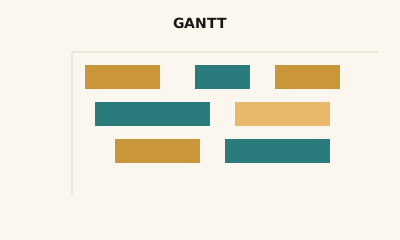
A Gantt chart is a timeline with tasks as horizontal bars. Each bar is one task or activity; the horizontal axis is time. Bar start and end are the task’s dates; bar length is duration. Rows are usually tasks, phases, or resources. Some tools show dependency lines between bars.
When to use a Gantt Chart
Use a Gantt chart for project or resource scheduling when you need to see tasks over time—start, end, duration, and overlap. Fits project and product management. Use a simple timeline or bar chart when you don’t need task-level schedule view.
How to read a Gantt Chart
Each row is a task; the bar shows when it runs. Left edge = start; right edge = end; length = duration. Bars that overlap in time are concurrent. Dependencies, if shown, link bars (e.g. one must finish before another starts).
Common mistakes
Too many tasks so the chart is crowded; no clear time scale; showing dependencies in a tool that doesn’t support them well.
Variations
Task Gantt; resource Gantt (rows = people or teams); with milestones or dependency arrows.
Gantt Chart in BI tools
Gantt views are in Tableau, Power BI, Excel, and in dedicated tools like Jira and Asana. Use for schedule and resource planning.
vs. other charts
Choose a Gantt over a bar chart when the x-axis is time and the focus is schedule. A bar chart compares categories; a Gantt shows when things happen.
FAQ
When should I use a Gantt chart?
Use a Gantt chart for project scheduling, resource planning, or any view of tasks over time. It shows start and end dates, duration, overlap, and—when supported—dependencies between tasks. Common in project and product management.
What do the bars on a Gantt chart represent?
Each horizontal bar is one task or activity. Bar position on the timeline shows start and end; bar length is duration. Rows are often tasks, phases, or resources. Overlapping bars show concurrent work.
Gantt chart vs. timeline or bar chart?
Gantt charts are timelines with tasks as bars; the focus is schedule and dependencies. A simple timeline might show only events; a bar chart compares categories, not necessarily dates. Use Gantt when you need task-level scheduling.
How do I show dependencies on a Gantt chart?
Many tools (e.g., Jira, Asana, MS Project) support dependency lines or arrows between bars (finish-to-start, start-to-start, etc.). In BI tools like Tableau or Power BI, you may need a custom view or add-in to show dependencies.
Have a chart you can't figure out?
Paste any chart screenshot and get a plain-English explanation in seconds.
Upload your chart →